
VNC Vista and Windows 7 alternative
Anyplace Control
|
In a fast moving digital epoch, time and money savings from using of remote control software become more obvious. Many of us have used VNC (Virtual Network Computing), but with the latest release of Windows Vista and Windows 7 the usage of VNC became a real challenge. Try to install and operate VNC-Server as a service mode, you will be facing a connection control problem to a Windows Vista or Windows 7 computer from another computer using Vista VNC client.
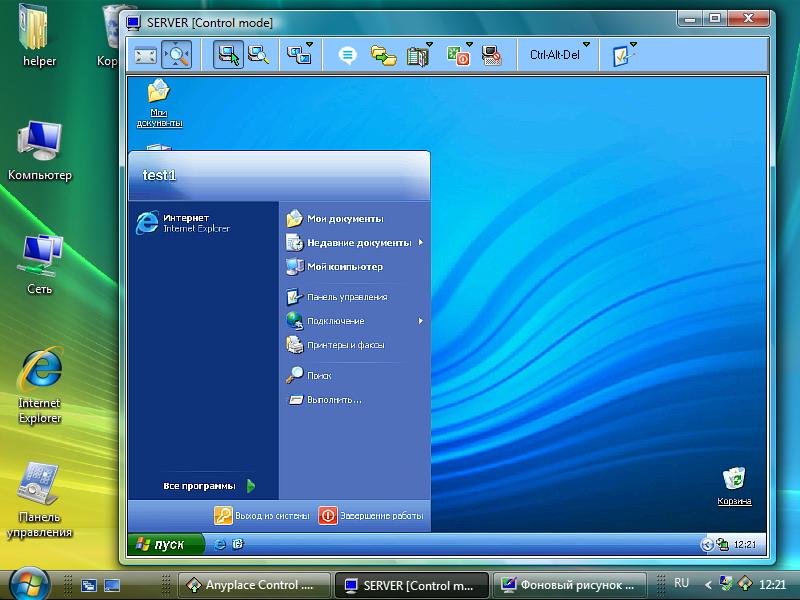
Anyplace Control is a unique program for remote desktop control. Engineered with more advanced technology while being user-friendly, it handles any of the technical and performance issues commonly known in VNC.
Anyplace Control is trouble-free application that provides equally high performance across all of the Windows operating systems (for
PC) including Vista/7/8. Anyplace Control is easy to use and it has a similar set of modules as VNC_viewer (Admin Module) and VNC_Server (Host Module). The Admin Module PC controls
the PC with the Host Module. It is important to mention that unlike in VNC, the Anyplace Control Host Module can be set up
to start as system service under the mentioned OS. Anyplace Control software allows you to connect to remote PCs using either an IP address or through the Online Account connection mode
saving you time and money on router, firewall and network settings. Unlike VNC-software, Anyplace Control offers a full package of important remote control features. If your PCs are located
on a LAN environment, you can deploy the Host Module remotely. A noticeably faster than average file transfer, tight security, Gateway server
load balancing and other performance measures is part of Anyplace Control's high service level guarantee. Anyplace Control is a real find for remote users. An optional preconfigured Host module is available for instant installation
and immediate deployment including the ability to create groups in Address Book, and other tools that are not a part of VNC. Anyplace
Control allows you to logically set your PCs for easy and fast search and control, set Admin rights for your staff to connect only to certain PCs
in your account. All registered customers of Anyplace Control receive free software update from our highly trained technical support during the subscription
period. There is unlikely a better service for such a reasonably priced product. Additional info Anyplace Control offers many advantages over Vista VNC including the entire line of VNC products:
Anyplace Control is a highly technically featured product that allows you to control remote PCs in a matter of a few clicks. Many people are interested in VNC solutions, which we already introduced in our product. Anyplace Control has similar functionalities, however Anyplace Control is fully compatible with all Windows versions. Additionally, it allows bypassing routers and firewalls in a secure environment making a connection over the Internet simple, fast and stable. In other words, a prominent connectivity scheme of Anyplace Control, a secure alternative to VNC, allows accessing a PC anywhere without making network configurations. Unlike VNC, Anyplace Control allows additional powerful features as File Transfer, Clipboard Transfer, Power Management with full Compatibility with Windows 8 or 7. About Anyplace ControlAnyplace Control is so easy to use for any type of computer user. It has industry-standard functionality and security features. The ease of use and user-friendly interface allows you to establish connection with the remote machine within a matter of minutes. Anyplace Control as opposed to VNC supports all flavors of Windows across the board. Multiple clients may connect to Anyplace Control server at the same time. A typical application for this type of technology includes remote technical support and file access/sharing between computers. RealVNC ViewerReal VNC is remote control software, which allows you to view and fully control a remote computer desktop (the server) over the Internet using another module of the program called viewer. The communicating computers do not need to be the same operating system. For instance, you can install VNC for Windows 8 to view desktop at the office from a Linux or Mac computer at home. For ultimate simplicity, there is an available Java viewer, which allows controlling a desktop user remotely by another person from a browser-based interface. TightVNC for Windows 8TightVNC can be useful to perform remote control and administration tasks in Windows 8, 7 or Unix/Ubuntu and other mixed network environments. It can be very helpful in distance learning and remote customer support. A number of additional VNC-compatible utilities and packages can extend the areas of functionality of a standard TightVNC. See the Related Software page for information about useful third-party software. UltraVNCUltra VNC is powerful, easy to use free software that allows displaying the screen of a remote computer on the screen of your local PC while connected over the Internet or on a network. The program allows you to use the mouse and keyboard of your local PC to control other PCs remotely. You can work on a remote computer, as if you are virtually in front of that PC. UltraVNC is fully compatible with Windows 8, and currently is the only version that allows you to experience all the frontiers of the remote controlling. |